
Tracking monthly expenses in a budget spreadsheet or template can help you manage your money a lot easier. Use our free budget spreadsheet to help you skip the math and start tracking and saving your money today. All data is stored on your end, so it’s private.
Regardless of which budget spreadsheet version you choose, I’ve kept things super simple by listing the biggest budgeting categories and showing you how it all adds up.
Free Budget Spreadsheet 2023
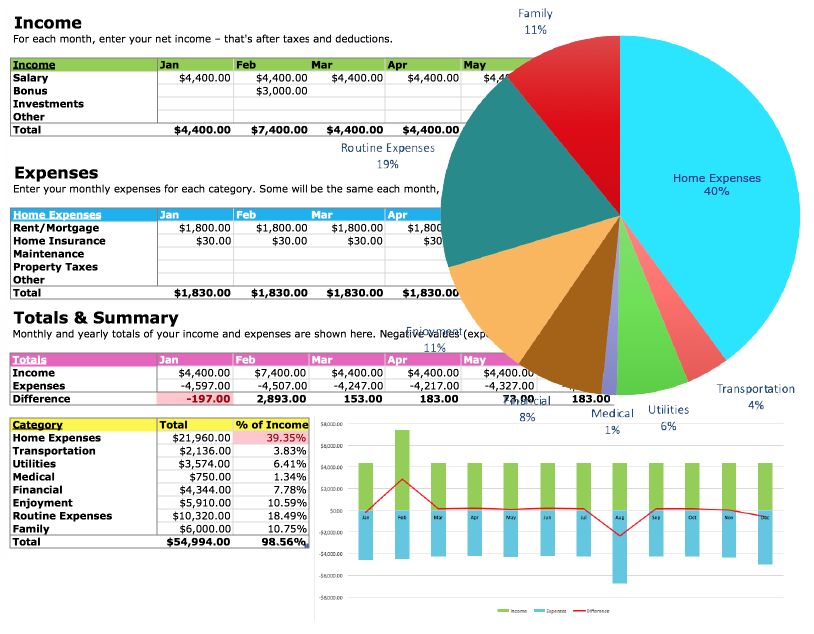
Download: Budget (2023 version)
Free Budget Spreadsheet (original version)

Download: Budget (original version)
How the Free Budget Spreadsheet Helps You
- Monthly Budget: List your monthly expenses, track your income.
- Budget by year: Get an annual snapshot of your success.
- Budget for individuals: Perfect for singles or couples.
- Household budget: Build a family budget with the kids.
- Budget worksheet: Print out as a monthly budget worksheet.
- Budget calculator: Show when you’re in the red.
- Customize: Add your own categories.
- Graph it: View categories in color. See overspending.
How to use the Budget Spreadsheet
Step 1: Download!
Download the 2023 Version (with graphs) or get the Original Version (blue cells). Or get both, I won’t tell.
Step 2: Track your spending!
Tracking every cent you earn and spend sounds like work, but it’s easy to do if you carry a notebook with you or save all your receipts. The idea is to track your cash, credit card, and debit card purchases to identify the costly culprits.
How to track spending
- Use a notebook. Pack a notebook or use an app.
- Write it down: Note every purchase. Get a receipt.
- Add it up: Tally your monthly expenses. See where you’re spending.
Stick with it! Budgeting takes effort. Feeling overwhelmed and stressed is normal. But getting past the feels can lead to greater money confidence and increased financial independence.
Step 3: Get budgeting!
Grab your receipts, sort your bills, and check your bank accounts. Fill in the blanks and account for your cash. Use the budget categories for:
- Income: Salary, bonuses, investments, spousal income.
- Home Expenses: Rent, mortgage, insurance, maintenance, property taxes.
- Transportation: Car, transit, fuel, maintenance, bicycle.
- Utilities: Streaming, internet, phone, electricity, water.
- Medical: Prescriptions, dental, health insurance.
- Financial: Bank fees, interest payments, debt repayment, savings accounts.
- Enjoyment: Gifts, holiday, pets, entertainment, restaurants, hobbies.
- Routine Expenses: Groceries, clothing, personal.
- Family: Childcare, allowance, activities, books, toys.
Keep it real and own it. Wherever you spend, however much you owe, whatever you save — Your monthly totals are not your self worth, it’s your starting line. Build from here.
Step 4: Turn it around!
Facing the numbers and looking for ways to cut spending, increase income, or changing spending habits can be a messy uncomfortable process. So get messy. By facing the hard stuff and making changes you’ll turn your money around, rather than turning your back on your money.
Step 5: Repeat, Revisit, Review!
Check in with your spending, earning, and debt reduction. Stay connected to your money. Daily, weekly, or monthly. Little reviews and updates can add up to big changes. Make the change.
You can do it!
Love love love,
Kerry


It really is easy to blow a budget without a budget plan or budget spreadsheet, and I think many people really overlook the importance of educating their children about money.
You might find this free Excel budget workbook to be useful in creating a budget. It brings to light certain implicit expenses that might otherwise be overlooked—maintenance and replacement expenses, mainly.
Hey,
Thanks for the tools. We have used similar spreadsheets when we teach tips on budgeting and I find that they’re all basically the same and will work well – IF people use them.
You can’t use a budget spreadsheet once and simply leave it. It should be reviewed at minimum once a month, if not weekly.
Great post,
Guy
We’ve been tracking our family expenses since 1996. I highly recommend the practice. The main benefit for us has been that once we figured out how much money we had and where it all went, we could be comfortable about spending it. For example, I never feel guilty about buying an expensive cup of coffee (or expensive organic veggies) – my budget covers me for a cup every day if that’s what I want, and I can enjoy that coffee (or the organic veggies) knowing that the cost of it isn’t “too expensive” or cutting into our vacation money, retirement savings or any of the other line items in our budget.
I just started making a budget, so thanks..this will help alot.
[…] Track your money with Squawkfox’s Free Budget Spreadsheet. […]
[…] particularly enjoyed the article “Track your Money with the Free Budget Spreadsheet”, it gave advice on how to use the budget spreadsheet provided, with the aim of you tracking your […]
This spreadsheet is very similar to one I used a few years ago. I’ve used several others since, but I think I’m going back to this one; it really is the best. I personalized it more by adding in extra columns to reflect my bi-weekly pay dates. The other “tools” I’ve used mainly show what I’m spending & when/where I’m spending it (like, when a bill is due, I open my budget spreadsheet, enter the amounts being paid, click AutoSum, and I’m done with it.) Still, I’m finding that I don’t have quite the same “stick-with-it” attitude doing it that way as I do with this one.
When I used this spreadsheet, I’d plug in all those non-changing items for the whole year (rent, transit expenses, cable, cell phone bill), and for other utilities, I averaged six months worth & added $10 to whatever the average was – since one bill is never the same unless you’re on some type of budget plan – With this guesstimate, I found that I generally had money back in my pocket which I applied to paying off a credit card here’n’there!
I was diligent with using this spreadsheet & checked it on a weekly basis. I kept a small memo tablet in my purse & jotted down any- and everything “extra” so I could enter it during the weekly check-up. If there were changes (and there usually were), I knew where the changes were coming from & where I needed to reevaluate that purchase that I considered a “little something extra” (mainly the frozen coffees I splurged on a couple days a week since the deli in my office building sold them)..and then I invested in a small blender from a nearby thrift store ($3.00+change) & concocted my own recipe with the items already in my pantry! (try that for a few weeks & watch your budget have a surplus!)
I’ve tried sharing my budget tips with younger family members, and they shake their heads at me ’cause they don’t get it (or maybe they just don’t get ME, go figure!) They think it’s just a little crazy or silly to do. (Even tho I must admit, when I was in my 20s-early 30s, I felt that way, too!)
[…] takes a bit of practice, but the payoff can be huge. Keeping track of your budget using this free household budget spreadsheet can also help you save money on all your other living […]
I love budgets and making budgets. I’ve had one that I’ve stuck to this last year or so, but I’m looking to move out, so I’m glad I came across this–it will be a huge help in remembering all those “extra” expenses that I don’t have at the moment, but will soon.
Being in my late 20’s, I’ve tried to tell my friends for years that the only way they will save money (and pay off student loans!) is by budgeting. I’m going to share this article in hopes that some of them will take the plunge! 🙂
Tracking your expenses is a great way to get started on your budgeting. It helps you understand your spending patterns and where your money is going. It can be amazing how quick it all disappears before you know it.
When you’ve tracked your spending for a month or two, you can see your spending patterns and plan better for your future when you know what to expect. It’s then far easier to plan ahead for those expenses rather than putting out fires of trying to gather the money together when those expenses comes up. Being prepared takes the stress and worry out of budgeting and finances. My husband and I have been using a calendaring program with reminders to do this for about 8 years now. It helps to keep us on the same page for finances and avoid financial stress in our relationship too. Happy Budgeting!
I’ve tried sharing my budget tips with younger family members, and they shake their heads at me ’cause they don’t get it They think it’s just a little crazy or silly to do…
This is so easy. I really appreciate it.
Hello,
Love the budget spreadsheet! I did it for 2010. Is there a way to have a 2011 one on the same spreadsheet but different page (on the bottom tab??) or do I have to download another spreadsheet for 2011?
Thanks! Keep up the good work!
Riva
Virginia USA
Thanks for the great budget speradsheet. Nice & simple yet includes about everything. I like the fact you can personalize it. We have an excel check register and have added 4 or 5 columns to track our variable expenses for the daily stuff. Thanks again Kerry.
Mike
Do keep in mind to keep some aside for other savings, like a vacation! Me and my fiancé were able to go on a cruise and do excursions only because we made it a point to put aside $100 a month! And when we spent it, we didn’t have to feel guilty about it. Budgeting is all worth it! We’re saving up for our next trip…
Thank you so much. I love your blog/site. I have read Dave Ramseys Total Money Makeover and had just begun my 7 day trial when I found your site. Needless to say I canceled my subscription to his site because your sheets are easier for me and free! I am really trying to trim the fat from our lives as next month we will lose almost $1100 a month in income. Major adjustment on our part. Also starting a small plant nursery to open this spring. So budgeting is a must from now on. I can’t thank you enough.
[…] be certain I am making progress. I found a practical and simple automated budget spreadsheet from Squawkfox that allows me to input my income and expenses on a monthly basis. In addition to the current […]
I started writing down every single purchase in a notebook a month ago, and almost immediately I noticed how fast those little mindless purchases add up. $8 for lunch, $1.50 for coffee, $15 for a movie ticket. By being strict with myself and adhering to a budget, I’m finding that I have more money left over at the end of the month that I can use towards my student loans. Thanks to better habits, I am on track towards repaying my loans by the end of the year!
Going on 27 years old, am fair skinned and in the last couple years I have noticed the wrinkles or the “fine lines” starting to happen. Definite grumble.
I am a pastry chef by trade, working in an underpaid job that I am thoroughly unenthusiastic about, actively trying to become fit and frugalicious. I’ve been working out everyday, sometimes once in the morning and once in the afternoon, although it’s tough trying to drag my butt out of bed every so often.
My parents made make-ahead meals all growing up, I love them. I loved your article that talked about lentils and other dried beans, etc. Buying them dried is something I’ve never considered until you. After reading it I was inspired to make some sort of lentil stew. It turned into a creamy red curry coconut lentil stew with whatever veggies we had on hand. We ate some that night, and I froze the rest in large mason jars (we’re anti-plastic as much as possible).
Love, love, love your articles, your creative ideas and this spreadsheet. Keep them coming you foxy woman! 😀
Much love from one of your many fans,
Rebecca
Thanks so much for the free spreadsheet! I have been trying to figure out how to begin budgeting and your spreadsheet makes it so simple!
Can t print the spreadsheet. What am i doing wrong. I ve tried many times. The page comes out blank
[…] (a fellow BC, Canada Personal Finance Blogger named by Globe and Mail as #1 PF blogger) has an easy spreadsheet you can download (and it’s free!). Make sure you include debt repayments in this […]
Great spreadsheet! It’s simple and straightforward. And with so many people using Google email and Docs, I’m wondering if it would be worth posting the spreadsheet as a public template in Google Docs (you can even add a little link back to your site for more advice). Anyway, it would make for an even more convenient reason to get those budgets started now.
And parents might want to consider getting their little ones involved as well. Starting them down the right road now makes all the difference in the world.
[…] Your Budget Spreadsheet available via Squawkfox […]
Thanks for the free spreadsheet. Will pass this along to other people I work with that make building their own budget worksheet so complicated.
It’s definitely a nice idea (a budget spreadsheet), but I’ve just personally found that keeping a general mindset of ‘only spend when you NEED to’ seems to be more helpful to me.
I used to be terrible at managing my money. Not in terms of, knowing how much I had, how much I was going to and had spent etc. – I always keep track and keep an eye on things, but just terrible in controlling impulse and stopping myself from spending irresponsibly… I’m not sure a budget spreadsheet would help with that problem, though it might.
But I dunno, I think a more general ethos of responsible spending is what you need to drum into yourself, or rather, learn over time by simply practicing the alternatives to giving into impulse. Not giving in can be as easy, as giving in, it’s just that some of us never allowed ourselves the chance to practice the sensible option.
Thank you very much. I have just started by downloading the spreadsheet. I shall visit you often to keep me motivated because I’ve started and stopped to often. Your emails are very heartening. Love you lots!
I love Excel and use it for tons of stuff. But my problem with tracking expenses is when we buy something with a credit card… because you’re not actually paying for it right then; you pay for it when you make your monthly credit card payment. And THAT payment will probably include charged items that are in other expense categories! Plus, if you record it both times – when you charge it and when you make the credit card payment – then it’s a duplication. So, which is more meaningful? When you charge it, or when you actually PAY for it?
My medical expenses are higher than my household mortgage which makes it hard to budget for sometimes. Thank you for your guidelines.
SF,
First, thank you for providing the curriculum, class materials and mentoring for a course that should be mandatory at all levels of education, free of charge!!! The federal gov’t should acknowledge the effort your making and the effect it could have on our economy if everyone followed the path you have so clearly laid out.
I was only fifteen when I received a copy of Chilton’s “The Wealthy Barber” in my stocking and have attempted to follow the barbers advice ever since. The funny thing is that as a student and then through a career as a snowboard instructor I practised pretty much what you have suggested with great success, ie with little income I budgeted, carried no debt, my possessions fit in a board bag and a backpack (no room for crap) and I was able to save/invest 10%. But now as I settle (bought a home, have just had our first child) into an “grown up” career making decent money with a fiancé who is also making decent money I find that we are hemorrhaging moolah. Last year with less than half of her income coming in (mat leave) we tightened the belt but still dipped into a line of credit. Big mistake!!! Now it’s like the rough budget that we have gets thrown out each month and the money intended for paying down the LOC ends up going towards the monthly cc bill as I refuse to carry any debt on a credit card. Oh my.
So we are starting from scratch, following your guidance and using the tools you have provided, we will develop a new financial plan that will allow us to reach our goals.
This leads to my first request. I have been going though the steps, making lists in the notes app on my phone and tablet. Not the most convenient method. Would you consider developing an app containing your system? I know that there are plenty of budgeting apps out there but they are just not foxy enough. What can I say, I like your style! And feel like you should be compensated for all of your hard work!!
My second request is for more information. You have stated that a method of reducing debt is to increase your income and thus increase what you can afford to put towards your debt. With that in mind I am considering turning a hobby into a side business. Choosing how it should be set up is confusing (private enterprise vs incorporation etc..) and I’ve learned that there are implications when running a business from home with regards to insurance and municipal taxes among other things. I would truly love to have a series of articles concerning this written from the fox’s point of view. Just putting it out there.
Thanks for everything,
Nat
[…] Banerjee explains in five simple rules how to think about your finances and focus on the 20 percent of what you really need to know to confidently take charge of your money. I love how the author presents the 5 simple rules right on the first page of the book, in the Introduction section. This is followed by a blueprint showing how you can score an easy A with your personal finances. He even mentioned fellow Torontonian blogger Kerry K. Taylor’s book 397 Ways to Save Money and her famous budget spreadsheet. […]
Actually, this worksheet is good for me and i hope i can manage well than before previous. Also i appreciate your work.
Thank you.
Hi Kerry,
I am looking for a spreadshett to track my savings/investments. One that can figure out my rate of return, track contributions etc. Stuff like that. I am not Excel savvy sadly. I looked on your websight but only found your great budget template which I have been using for several years. Hence my savings and investments. Do you have a savings tracker? Can you send me in the right direction for one please? Thank you. Keep up the good work.
Susan
This it’s my first-time trying to create a budget, it seems easy enough, are there any suggestions from the more experienced comment posters on here,that would like to share their wisdom, mayben idea that later in your practice you said “I wish I would have done this sooner”
Thank you
A. Santos
I worked out a method to construct a budget based on using take-home pay and working out not only explicit expenses (e.g., rent, utilities, car payments, groceries, etc.) but also implicit expenses (e.g., replacement expenses for car tires, batteries, etc.). I put it into a worksheet you can download (free). More info here.
Great tool! This is really going to be very helpful and it’s easy to follow. Thanks for sharing.
[…] business is working out what income you want to earn. Do a personal budget (I recommend using this template from Kerry Taylor of Squawk Fox) but instead of starting at the top with income, start with […]
I’m looking for bank statement software,I’m going through a divorce and I need to analyze years of statements to show life style issues.Any ideas?
[…] business is working out what income you want to earn. Do a personal budget (I recommend using this template from Kerry Taylor of Squawk Fox) but instead of starting at the top with income, start with […]
Excellent website. We have used a spread sheet to track expenses monthly for over 15 years. Every year we use the data to choose an area or two to deliberately reduce costs, e.g. communications, insurance, groceries, transportation…and then tackle that area and gets expenditures down. It’s amazing what you can avoid if you spend a little time finding a better service provider, or get rid of a service you don’t need anymore. Your needs evolve, and the products and services options change so rapidly now it is important to revisit decisions regularly. It is also critical to know your financial needs to be able to plan your retirement. You can retire sooner and more comfortably if you know what you need – and what you don’t. It helped us reach freedom-fifty. Good luck!
Do you have a spreadsheet that captures a couples individual income, expenses etc for each as well as a combined/shared account. I am recently retired and my husband and I would like to keep separate accounts but also maintain a joint checking account where we would each shared expenses and each deposit from own savings into the joint account to pay common expenses
This spreadsheet is a good basis for getting a handle on monthly household expenses. However, your definition of “utilities” is too broad per the IRS. Utilities are typically defined as companies that supply what are considered basic (essential) services to homes and businesses, such as electricity, gas, telephone, water and sewer connections. They should not be confused with non-connective services such as cellular telephone companies, nor to optional services such as satellite dish or cable-tv providers.
https://en.wikipedia.org/wiki/Category:Public_utilities
Cell phones, internet and cable/satellite TV may be monthly expenses, but are not by definition, “utilities” (though cell phones and internet are becoming more and more essential as time moves forward). I would suggest two “Utilities” sub categories…”Essential” and “Non-Essential”. This way all those expenses are still taken into account on a monthly budgeting basis but are also properly separated for possible tax purposes.
I know it all sounds a bit nit-picky, but it is more precise and correct per the actual definition of what is considered a utility.
I’m looking for a good budgeting tool which will be easy to use however they all seem to be base on monthly items. Most workers are paid bi-weekly and I need some where to put that kind of item. There was one comment about adding columns (or rows?) for the bi-weekly items but not how to do it. I’ve looked at the spreadsheet and can only see that if I add columsn (or rows) I will have to make changes further down for the calcs to work. I’m not computer illiterate but I’m not an expert. I need some instruction as to how to do this. Can anyone help me?
Thank you, I was about to start creating my own sheet, but then I thought, for sure someone must have already shared one online, and then I found this, I already downloaded it and I can’t wait to use it, thank you.
As far as budgeting spreadsheets go, have you seen Aspire? It’s designed to be much more intuitive and user friendly compared to typical spreadsheets.
Thank you for this great work! In terms of the pie chart, what percentage breakdown of expense categories should a person aspire to? Are there rules of thumb?
It’s my first time creating a budget. This is gonna be very helpful. Thanks for sharing this great work.
These budget spreadsheets have a nice balance between simplicity and usefulness, which is always welcome when it comes to managing your money.
I’m a huge fan of budgeting and money monitoring. If somebody doesn’t monitor his money, the beginning of the year is the right time to start doing it.
Kerry, thank you for sharing these super functional spreadsheets!
Very helpful, Thanks.
I have been using a basic spreadsheet for years and it rally does help with budgeting, especially when you need to cut some expenses.
Thanks for the sheet. From 2022, I need to monitor my expenses more urgently.