I’m really excited to reveal my new Portfolio MER Calculator.
I wanted to create a calculator to show you how those hideous management expense ratio fees (MERs) can eat up your mutual fund portfolio returns, year after year.
My hope is you will save big investment bucks tomorrow by learning how your fees eat into your returns today.
Use the Portfolio MER Calculator to:
- Tally the average MER for your portfolio.
- Tally how much you pay yearly (or dearly) for the total funds held in your portfolio.
- Tally how much you pay for each individual fund based on its percentage in your portfolio.
- Run reports to see the big fee picture.
To use the Portfolio MER Calculator:
- Open the Portfolio MER Calulator.
- In Total Portfolio Value: $, enter the total value of your portfolio in dollars (for example: 25000).

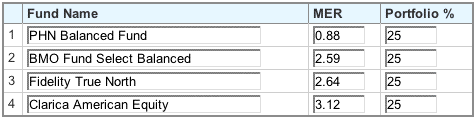
- Enter the Fund Name, MER, and the Portfolio % this fund comprises in your total portfolio.

- Click Add Fund to add a new line and to continue building your portfolio.
- Continue entering fund data until you have entered 100 percent of your portfolio value.

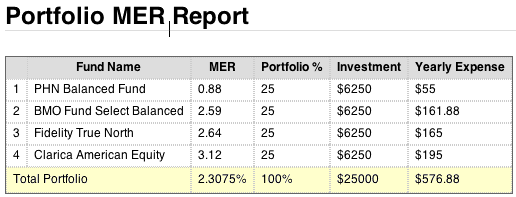
- Click Calculate. Your portfolio Average MER and Yearly Expense displays.

- Click View Report. A detailed report displays and outlines the cost of each individual fund. Use this report to make better informed decisions when buying mutual funds.



Let me know what you think!





Great tool! A real eye opener, and makes me really want to move towards lower MER index funds (currently in the process of opening a TD e-Series Account!) Thanks for your work!
Thanks for your kind comment DC! I am beyond thrilled you found value in the MER Calculator! Indeed, it’s amazing how those MERs add up.
I think your calculator helps in protecting investors. Can you provide implicit assumptions behind it and the algorithm?
Ken Kivenko
Chair, Advisory Committee SIPA
Hi Ken,
I initially created the “Portfolio MER Calculator” to see the full impact of fees on my own mutual funds. After playing with the results, I decided to share my tool with others. I’m not surprised that mutual fund companies don’t share this data with investors.
This calculator uses the proportions (portfolio %) of each fund and the portfolio total amount to calculate the actual dollar amount in each fund. The MER for each of these is then used to calculate the expense for each fund. These are added up to give you the total yearly expense, which in turn is used to calculate an average MER.
The tool does not take growth throughout the year into account, and also assumes that the portfolio percentages add up to 100%.
Is that how MER fees are actually calculated? I’ve been trying to figure this out and am very confused. I thought the MER was calculated based on the return that year.
So if you made 10% on your investment and your MER was 2% your actual return would be 8%.
This calculator is just calculating 2% of the principle regardless of return.
Does annual return not factor into things at all?
Thanks for any feedback.
When I click on the Portfolio MER Calculator it takes me to another page but the Calculator is missing?
Has the calculator vanished? I really like it and have used it for many years to educate people on the cost of their portfolio.
Hi Mike, I fixed the problem. Let me know if you’re still having an issue. Thank you so much for educating others on MERs. Cheers, Kerry
Hi Leo, I fixed the issue. Let me know if you’re still seeing a bug. Cheers, Kerry
Hi Kerry,
Awesome tool! Thank you. Wondering if it would be possible to download the actual spreadsheet. It would be helpful to save the various/numerous scenarios I’ve run through the tool.
Marc M
Hi Kerry, this is a nice tool. Many investors don’t understand the impact of fees or even know how to calculate blended MERs. And the Canadian cost and performance reports don’t tell the whole story because they only include costs paid to the advisor or their firm.
One item I will suggest is to add the ability to include an additional management fee that applies to the entire portfolio. This would enable users to calculate their total cost on a robo-advisor portfolio like WealthSimple that adds a flat 0.4% or 0.5% fee on the entire portfolio value.
BruceMcK
The calculator seems to be missing from the page! I use this quite frequently to calculate the MER on client accounts. Is it gone forever?
Hi Ashleigh,
It’s fixed! Thank you for letting me know.
When I updated my server the code for the MER calculator was missed. Thank you thank you. I’m so happy the tool is helping you and your clients.
Cheers, Kerry
Hey, Kerry! It looks like the MER calculator page has an error! Just FYI, wasn’t sure if you were aware. Thank you so much for creating this tool, it is so helpful!
Hi Ashleigh, Thank you for finding the error and letting me know! We’ve been updating the site and totally missed migrating the MER Calculator. It’s fixed now. I’ve got plans to update the UI for this tool so it looks a little nicer. Again, thank you for helping me get it fixed. 🙂 Love love love, Kerry
Hi Kerry! The portfolio percent total calculation seems to be off and I wonder if it’s throwing other numbers off. For instance, after testing it out, when I enter the portfolio % of a holding as 0.9 and tell it to “calculate” with that being the only holding entered, it says “Portfolio % total must add up to 100%. Total currently is 90%”. It should be telling me that the total currently is 0.9%.
I hope that makes sense!